![Sdfdcreenshot_1.png]](https://knowledge.pushitreplays.com/hs-fs/hubfs/Sdfdcreenshot_1.png?width=40&height=54&name=Sdfdcreenshot_1.png)
1) Check the Power Supply of the Pushit device (processor)
LED Indicators depend on your Pushit controller version:
- Red/white case → solid red LED + blinking green LED ✅
- Black case → solid green LED = good functionality ✅
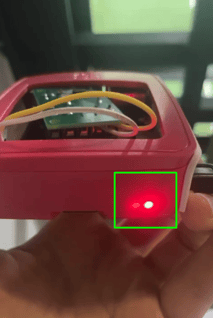
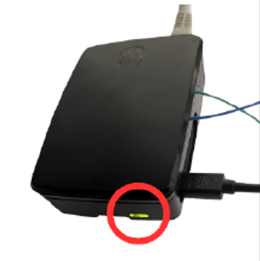
⚡ If the LEDs do not show these signals, or the power supply does not meet the requirements, inspect or replace it.
Power Requirements:
- Raspberry Pi 3B (red case)→ 5 V / 2.5 A
- Raspberry Pi 5 → 5.1 V / 5 A
2) Check the Button & Relay
Button Test:
- Press the PUSHIT button on the court.
- Confirm that the relay light turns on alongside a clicking sound (The relay is the small blue component inside or near the device).
- If the relay turns on → the button and relay are connected correctly.
If the relay is not clicking, it means there is a connectivity issue between the button and the relay.
- >To fix that, check the Article: faulty button
Example: External 12V Relay- red LED clicking
5V Relay built into the Processor case - green LED clicking
3) If the Relay Works - clicked when the button on the court was pressed, but still no videos appear:
- Check that there is no loose wire between the relay and the processor's pins.
-> Verify that the normally open and COM wires are connected properly (Yellow and Pink in the diagram below example). - Send us a video/photos of the Hardware, and we’ll get back to you with a solution.