![Sdfdcreenshot_1.png]](https://knowledge.pushitreplays.com/hs-fs/hubfs/Sdfdcreenshot_1.png?width=40&height=54&name=Sdfdcreenshot_1.png)
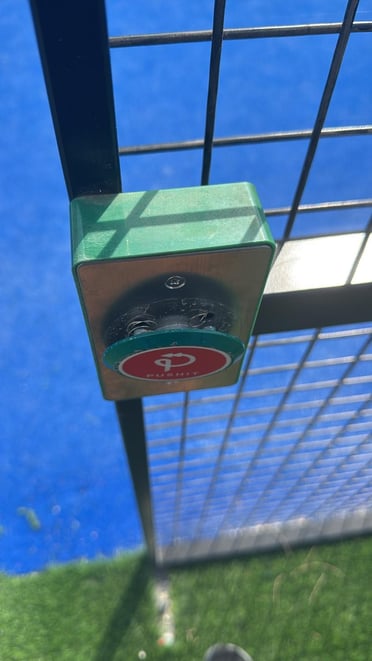
1. Button Fixing Instructions (PUSHIT)
-
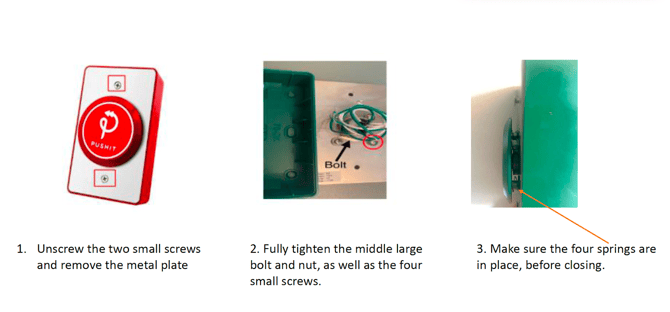
Unscrew the two small screws and remove the metal plate.
-
Fully tighten the middle large bolt/nut and the four small screws, then loosen each of them by one full turn - test the button and confirm it is clicking.
-
Ensure the four springs are in place before closing.
2. Additional Troubleshooting Checks
-
Cable connection → The extension cable must be connected to the “Normally Open” wires at the back of the button (usually green — check the label).
-
Click sound → The button should make a clear “click” sound when pressed.
-
Random clips → If clips are created randomly, the button may be stuck in the “always pressed” position.
In this case, fully tighten the 4 small screws, then release them slightly so the spring isn’t under constant pressure.
3. Final Test
After reassembly and adjustments-
Press the button several times to confirm:
-
The click is audible
-
Clips are not generated randomly
-
The system responds correctly, and clips are created at each press of a button